Thanks for helping Stepping Stone and the San Diego HIV Funding Collaborative by participating in fundraising for The Recovery Ride.
Since social sharing is a great way to promote your cause we have put together some tips for you and a how to guide on sharing your fundraising page.
Some basic tips:
- Make it personal. Explain why you care about this cause. Example “I am supporting the Recovery Ride because I want to make sure Stepping Stone can continue to serve those looking for help with alcohol and drug addiction” or “I am supporting the Recovery Ride to help local agencies serve those with HIV”
- Don’t be afraid to ask again. Many times it takes two or three posts to get traction. Many people see the first post and want to support. The next posts are the reminder they have not done anything yet.
- Comment on the post as often as possible, it means more people will see it. Comment on other team member’s posts to help them out.
- Thank those who donated in the thread of the post. It is a good way to show thanks and helps keep the post at the top of the thread.
Here are some options for how to share your page.
3 examples below:
- Share from Crowdrise Page
- Share from Facebook on web browser
- Share from Facbook on mobile phone
For these instructions you will need to have your fundraising link. If you do not have it you can find the team pages here and look for your page. https://www.crowdrise.com/Steppingstonesd You can also just ask you captain.
Use the share button on Crowdrise.
- Go to your fundraising page URL.
- Under the default image select the Facebook Share button.
- You may need to login to Facebook here.
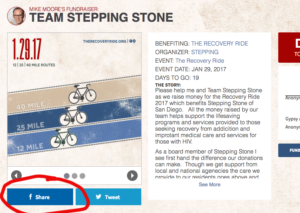
- Add your personal message and select “post”

Share from Facebook web browser.
- Go to Facebook
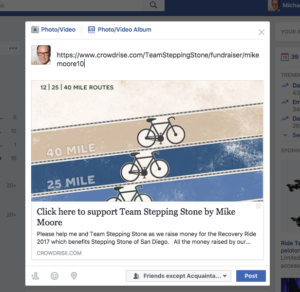
- Post your fundraising link into the message space. This will pull in the image and details from your page.
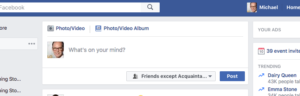
- Add a personal message. I leave the link there at the end of the personal message just to be safe.
Share from your phone (iphone shown here)
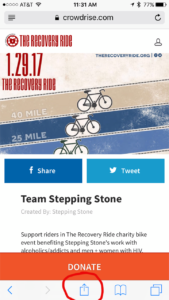
- Go to your fundraising link in your browser.
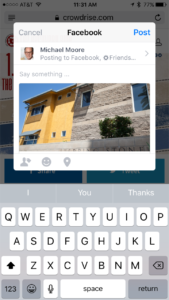
- Select the share button from the bottom of the browser or select the Facebook share button on page.
- Add your personal message and Post.